> > CONTENT
Solution to Login Failure with Facebook on iOS Devices
2024-05-07


Dear Lord, if you fail to log in with Facebook and see the error message in the picture, please follow the steps below:


Step 1: Open Settings on your Apple device.


Step 2: Swipe down or search to find Wartune Ultra and select it to view permissions.


Step 3: Find the Allow Tracking option.
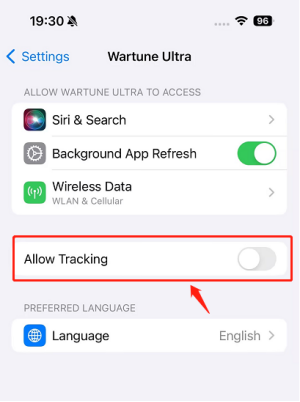

Step 4: Toggle on Allow Tracking and then select Allow.
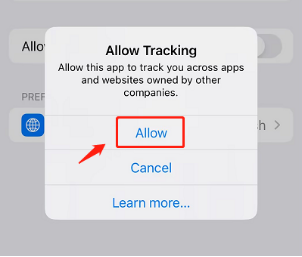


The setting is completed when the Allow Tracking toggle turns green.
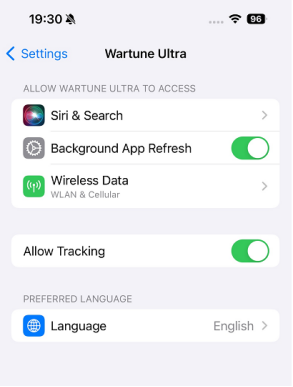

Now open Wartune Ultra and try again. Enjoy the game!


Accept
  • Cookie Policy

    When you visit any website, the website may store or retrieve information on your browser, mostly in the form of Cookies. This information may be about you, your preferences, or your device, or it may be used to make the website work as you expect it to. The information does not usually directly identify you, but it can give you a more personalized web experience.

    More Information
  • Essential CookiesAlways Enabled

    These cookies are essential components required for the operation of our website, so they cannot be disabled in our system. These cookies are set based on your instructions and are considered as your service requests, such as logging in.

Hi, yukineko1108